Showing posts with label finance. Show all posts
Wednesday, December 11, 2019
How to find bank branch number
How to find bank branch number

How to Find the Branch Number of a Bank
Your checks contain important information you'll need when sending and receiving funds. A bank's branch number, which is different than either its routing number or your account number, is used to identify different branch locations in the same area. You can find a bank's branch number in several locations.
How to Find the Branch Number of a Bank
You can find your bank's branch number in the following ways:
- Look on your checks for the bank in question. The branch number is usually found in the upper right-hand corner, though this option is not available at all banks.
- You can usually find your bank's branch number on its website under frequently asked questions (FAQs).
- Call your bank's customer service department. The representative can provide the branch number where you first opened your account.
Why You Might Need the Branch Number
Some banks require that you provide the branch number when ordering checks, although this practice has been discontinued at some banks.
How to Find the Branch Number on a Check
Step
Start by finding the check number on your checks. The check number should be found in the upper right corner of your checks.
Step
Once you've found the check number, look below it and you should see a smaller number. This number is your branch number. It is usually two digits. It represents the branch you first opened your bank account at. For example, if you opened your bank account at your bank's first branch, the branch number would most likely be "01."
Step
If you can't find your branch number, it could be in another location on the check. Your branch number may also be located on the right hand side of the routing number.
Step
If you are using checks without check numbers, you might still be able to locate the branch number on the right hand side of the check.
What is a BSB number?
A BSB (short for Bank-State-Branch) is a six-digit number used by banks in Australia. A bank's BSB number distinguishes between banks and branches in Australia.
Thursday, February 14, 2019
How to file tds return
How to file tds return

Sometimes navigating and uploading a TDS return on the TRACES portal can be difficult for some of the taxpayers. Complying with the data procedure too has been found tedious by many. Therefore, to ease the process the income tax department has provided for uploading the return on their own website, which we cover in detail in this article.
- Prerequisites for uploading TDS returns
Before you start uploading the return, you must ensure the following.
- You must hold a valid TAN and it should be registered for e-filing
- Your TDS statements should be prepared using Return Preparation Utility (RPU) and validated using File Validation Utility (FVU)
- You can prepare your returns in an easy manner using ClearTDS
- You should have a valid DSC registered for e-filing if you wish to upload using DSC
- The principal contact’s bank account or demat account details should be provided or the principal contact’s PAN should be linked with Aadhar if you wish to upload using EVC
How to upload TDS statements on income tax portal
Here is a step-by-step guide on uploading TDS statements on the income tax website:

Step 2: Enter your login credentials and click on ‘Login’. Your user ID will be your TAN.
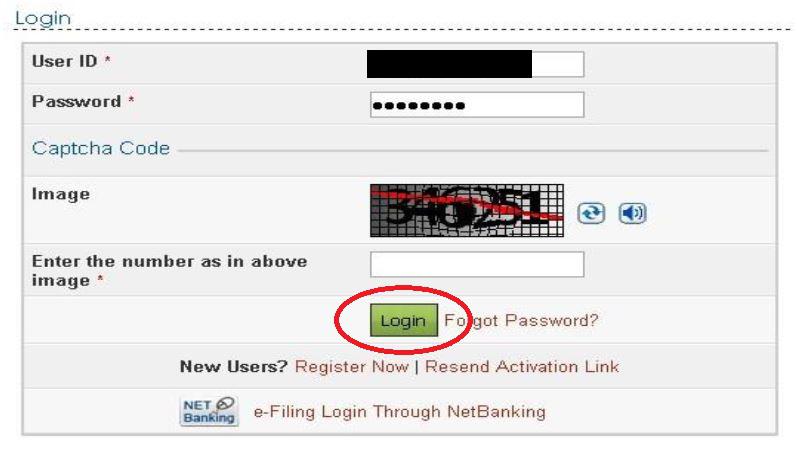
Step 3: Once you’ve logged in, click on the ‘Upload TDS’ option under the TDS tab.

Step 4: You will be provided with a form where you will need to select the correct details. Once the details are selected, click on Validate.

Note that TDS statements can be uploaded only from FY 2010-11 and only regular statements can be uploaded on the income tax website.
Step 5: The returns can be validated through the following modes:
Step 5a: Validate using DSC or Digital Signature Certificate.
The TDS statements can be uploaded using DSC. To upload using DSC, first upload the TDS zip file and also attach the digital signature file. Then, click on Upload.


Once the TDS statement is uploaded, a success message will appear on the screen and a confirmation mail will be sent to your registered email ID.

Step 5b: Validate using EVC or Electronic Verification Code.
After step 4, if you haven’t generated a DSC, you will be able to validate the TDS statements using an electronic verification code (EVC). Upload the TDS zip file and click on ‘Click here to E-verify’.

The next screen will give you the option to use an EVC already generated or generate a new EVC.

Select the relevant option, enter the EVC and click on ‘Submit’.

Wednesday, February 13, 2019
How to use fuliza
How to use fuliza

How to Use Fuliza, Safaricom’s Overdraft Facility; Service Fees and Repayment Process
During the announcement of Safaricom’s Half Year results in November 2018, Safaricom made a series of announcements, including the launch of an overdraft facility dubbed Fuliza. The product has since gone live with fanfare owing to its offerings.
To reiterate, Fuliza is more of an Okoa Jahazi for M-PESA services, specifically Lipa Na M-PESA products – Pay Bill and Buy Goods, and sending money. In essence, Fuliza complements M-Shwari – but it is not a loan service as the latter offers credit to M-PESA users that should be repaid after 30 days.
Who qualifies for Fuliza
Similar to M-Shwari, Fuliza is offered by Safaricom in partnership with the Commercial Bank of Africa (CBA). It is available for all M-PESA users, but you must have been using the mobile wallet for more than 6 months. Also, similar to M-Shwari loan limits, the overdraft facility’s limit is based on a user’s transactions profile.
“Our continued collaboration with Safaricom aims to drive financial inclusion in a digital economy. With our technological innovation and responsible lending principles, we will advertently bring more people into the financial system, encourage more transactions, more savings and, ultimately achieve stronger economic growth,” says Isaac Awuondo, CBA Group Managing Director.
The service can be accessed by hitting *234#, which should also give users their overdraft limits. It is available on STK and mySafaricom app.
Differences from M-Shwari
As mentioned, Fuliza is not a loan product.
Once activated via USSD code, it automatically kicks if they fall short of funds when using Lipa Na M-PESA services or sending cash. Users, however, cannot withdraw from Fuliza.
Service fees and interest
Besides the regular M-PESA transaction fees, Fuliza attracts a 1% access fee and maintenance charges on the outstanding balance as shown below:
| Band | Tariff | Promotional Tariff for 30 day from launch |
|---|---|---|
| 0-100 | One-time fee of KES 2 | One-time fee of KES 0 |
| 101-500 | KES 5 per day | |
| 501-1000 | KES 10 per day | |
| 1001-1500 | KES 20 per day | |
| 1501-2500 | KES 25 per day | |
| 2501-70000 | KES 30 per day |
Repayment
The overdrawn funds will automatically be subtracted as soon as a user deposits funds to their M-PESA wallet. You will still be able to access the service as payment is regularized. Say your limit is 1000 shillings, and you deposit 500 shillings to your account after using Fuliza (plus interest); you can still overdraw the remainder (KES 500 or less) until the limit is reached again.
Some people have asked if they can get money reversed if they send/pay to a wrong number or till and had used the overdraft. Safaricom says that the reversal process goes into effect if the wrong recipient has not used the money. Similar to conventional reversal processes, transaction fees will not be reimbursed.
Finally, users cannot access the Fuliza limits if they have an unpaid balance after day 30 but can be restored upon clearing the balance.
Sunday, January 20, 2019
How to get a national insurance number
How to get a national insurance number

What is a National Insurance Number?
An NI number (often called NIN or NINO) is similar to your Tax File Number in Australia, IRD in New Zealand or SIN number in Canada. In the UK the NI number is also used as a form of identification by many departments including the free NHS healthcare system.

Usually during your first week of work, your employer will ask for your NI Number.
If you don’t have one, your employer has no way of advising the British Tax Department (HM Revenue and Customs) the amounts you need to NI contributions for state pension and the British social security system should be. You must pay emergency national insurance contributions (emergency tax) until you get one – typically a big percentage of your take home pay!
How to get an NI Number
A typical application process can take weeks if not months and involve phone calls, an EOI (Evidence Of Identity) interview, follow up calls and and long wait times and thats assuming everything goes well. Fortunately there is much easier way. A number of companies in the UK exist to help with this process. For as low as £30 there are online services which help in a number of ways:
- Many people can avoid the EOI interview altogether
- If required, the interview can be arranged for you
- The information required for the interview can be pre-checked
- Any changes to interview times, follow up calls, changes of address or other issues that arise can be dealt with by them
My advice is simple – Save yourself a lot of time and trouble by using a reputable service to assist.
Here is our current top recommendation.
Now, if you have time and lots of patience you can always get your NI Number without assistance but allow me to explain what makes the NI Number application process so time consuming and stressful.
Step 1
Call the phone number 0345 600 0643 at Jobcentre Plus during business hours to arrange a national insurance number interview. Be prepared It is usually busy – very busy. The times offered will be during business hours and available times will depend on how busy they are and arranged at an address nearest to you.
Note: For non-EU citizens the interview can be avoided if you use a service.
Step 2
Prepare documents for interview. After scheduling an EOI (evidence of identity) interview, then you have to gather your documentation for the interview.
Note: For people coming from overseas, it can be challenging because one of the key parts of the process of getting a number is proving your identity which often includes an address and bills in your name. But wait, perhaps you just arrived from overseas. So what do you bring? A service can help to ensure you have the necessary documentation.
Step 3
Wait or follow up if required. Assuming everything goes well in the interview and you are not invited back – you wait. This step usually takes a few weeks but sometimes months to receive your number and card by mail. Although you do nothing, this step can be the hardest because while you are waiting you are still getting charged emergency tax. You will also often have no idea if your application will be successful or not.
Note: Wait times vary depending on the departments workload, but a service can give you a good indication of the timing because they are dealing with successful registrations each day.
WARNING: Changing your address (which many people do after first arriving to the UK) can result in having your NI number lost in the post (read the comments below, it happens all the time!). One more reason to use a service is that they will help file the necessary change of address paperwork and follow up for you.
Cut the red tape, avoid the frustration
Use a reputable service to assist you in your NI Number application.
They will:
- Organise your interview for you (at a time convenient to you) or arrange to avoid it all together
- Make sure you have the identity you need
- Deal with changes to your address and any other issues that may arise
Unfortunately the process of obtaining an NI number normally takes 2 – 6 weeks (sometimes months) from the time you schedule a meeting. The time it takes to get one depends on availability of interview times for your local Department of Work and Pensions (DWP) office and then there is also the time it takes to get your NI number processed. In the meantime, you will be issued with a temporary national insurance number, but this is just to keep track of the extra contributions you will be making until you get your NI card in the mail and advise your employer.
Fortunately there are some paid services that Work and Travel Companies provide that help to avoid a lot of frustration and can ensure maximum speed in the process. For example, if you are non-European you can avoid having to attend the DWP interview. This is due to all the requirements you have to already met to get your visa and is a great way to get a national insurance number online. This itself is well worth the small fee, but where they really come into their own even if you have to attend an interview is in making sure things run smoothly. For example, there are many instances where processing is delayed when one of the requirements of your EOI interview are not met. Initially they assist in filling out the NIN application form. In many cases something as simple as a change of your address (or not having an address) creates bureaucratic confusion which delays getting your number issued. Many problems have been avoided with the help of a service. You can also do it yourself (DIY) and we provide the methods to do it.
However I also want you to know that we get emails daily and many comments of people having issues – here are some from below:
“4 weeks have passed already and I don’t have an interview scheduled and I still haven’t received any forms to fill in” Paolo“I applied for a NI number and went to an interview, but after (2-4 weeks like the interviewer said) they sent me a letter saying that they declined it.” Hristo“I filled out the paper Form CA5403, passed in the office HM REVENUE, (and was) told to wait up to 6 weeks. I waited 2 months but nothing … ” Stan
This service is highly recommended and is used by many expats and working holiday makers because you can avoid a lot of hassle when you applying.
Note: If you are British (and in the UK when your were 16 years of age) you will have been sent your NI Number by mail. If you are were not in Britain not in Britain of have misplaced your NI Number there are other ways to get assistance – please see our British section.
More Information
Different options apply based on your Nationality
Non-European Economic Area Citizens (Any country outside of Europe)
Three Options:
- Online (no interview required)
- Assistance (interview required)
- DIY (interview required)
All European Citizens
Two Options:
- Assistance (interview required)
- DIY (interview required)
Frequently Asked Questions (FAQs)
Q: Do I need an NI Number to work in the UK?
A: Yes and No. No, not initially but eventually yes. You can work immediately without an NI Number however you must start the application process as you will eventually need to provide your employer with your NI Number. Until that happens you will be paying an emergency tax—which could be a large portion of each pay day.
Q: How long does it take to get a National Insurance Number?
A: 2-6 weeks is typical, sometimes months. First you need to schedule an EOI interview or a service will do this for you – if a service can arrange for you to avoid the interview this can save weeks. The wait times are dependent on how busy the office in your area is. After your interview you will still need to wait for your NI Number and card to arrive in the post. This process can take 2-6 weeks, or longer.
Q: Do I need to be in the UK when I apply?
A: Yes. If you are doing it yourself you must be in the UK when you apply. For piece of mind, you can start the ball rolling with a service before you arrive. Knowing exactly what you need and what to do when you get there can be really helpful especially when you are dealing with many other issues like jobs, places to live and settling in.
Q: Can I expedite the process?
A: While using a service doesn’t mean the process is expedited, they can help you avoid the interview process in some cases. They can also ensure your documentation is sufficient and any address changes, etc. are handled correctly, thus reducing complications with your application and ensuring the maximum process speed.
Q: How can I bypass the EOI interview process?
A: Normally, if you are a Non-EU resident you have already submitted much of the information needed through your visa process and are eligible to bypass the interview with the help of a service. If you are British or EU resident you will have to do the interview.
Q: I’m staying with a friend and don’t have any bills in my name. What else is considered proof of address?
A: It is common for new arrivals to the UK to not have sufficient proof of address. In this case, it is highly recommended you use a service that can advise you on how to establish your identity in the UK and obtain the necessary documentation.
Q: I had my interview a couple months ago and still have not received any notifications in the post. What should I do?
A: Unfortunately, the only thing you can do is call the Jobcentre Plus and follow up. This is one reason why using a service is helpful. They can troubleshoot these issues on your behalf and have a better understanding of timing since they handle these requests every day.
Q: I am in the process of applying for an NI Number and have moved. What should I do?
A: If you are scheduled for an interview in the near future try to still attend it. If you are waiting for notification about your NI Number and card contact the Jobcentre Plus right away. If you used a service they will take care of this for you.
Q: My employer says he can’t pay me (or employ me) until I have an NI number. Is this true?
A: No. You are legally entitled to your wages and it will not hinder your employment prospects if you understand the process and can explain it to them. Inform your employer that you are in the process of applying but assure them you are getting one – you will. They will have to pay an emergency tax contribution in the meantime but this does not cost them anything extra – it comes out of your pay. Withholding wages is not legal and understanding the process can be helpful if your new employer is not familiar with hiring people who have just arrived from overseas.
Q: Once I receive my Number can I get the emergency tax I paid back?
A: Yes. Once you receive your NI Number you can enter a claim to receive the money deducted for emergency tax back – usually when you submit your tax return at the end of the financial year.
Q: Other than an NI Number, do I need anything else to work in the UK?
A: Having an NI number does not equate to having a right to work in the UK. Normally a visa (specifically one allowing you to work) is also required. We do not specialize in offering information about visas. We suggest using a visa company if you have questions about your work status.
Q: I am working outside of the UK but for a UK-based company. Do I need an NI Number?
A: Normally, if you are working abroad (not residing in the UK) you should not need one (as you will be taxed in your country of residence). We do not specialize in offering information about taxation. We suggest contacting your employer or a personal accountant for further information.
Q: I had an NI Number before. I’m going back to the UK. Do I need to apply for a new one?
A: No. You will only ever have one NI number. It is associated to your person forever. If you have misplaced your NI Number you can learn about how to retrieve your NI number.
Do you have any other questions or helpful comments to share with non-British Citizens about retrieving or getting an NI Number? Please leave them below.
Saturday, October 6, 2018
how to check bank balance sbi?
SBI Balance Enquiry Toll Free Number

Until the mobile app and net banking services were offered to people, the account passbook and ATM were the two main options for people to do a balance enquiry. Until the demonetisation drive initiated by the Indian Government, many people that even had registered for net banking still used ATMs to check account balance and get mini statement carrying the details of the last 10 transactions carried out by the account holder.
There are plenty of reasons why balance enquiry is carried out more frequently by people as compared to other banking transactions, such as:
- To ensure that the account has sufficient funds for money transfer, cheque payment, etc.
- To check if the money sent by the receiver has been credited to the account
- To make sure that the amount debited for a transaction that failed has been credited back
- To see if the interest (in a savings account) has been deposited by the bank on time
It is advisable to keep a check on the account balance from time to time and ensure that there are no unauthorised transactions. Also, check your monthly statement to see your unnecessary expenses and cut them to save more money. Keeping an eye on account balance and transactions can also help you make a monthly budget.
State Bank of India (SBI) understands the importance of balance enquiry service for its customers and offers plenty of options for them to choose from. SBI has catered to the generation that was not internet-savvy and is now geared to serve the millennial who love to carry out banking online. Therefore, the State Bank of India balance enquiry service is available both offline and online.
Here are a few ways in which SBI customers can check their account balance:
- Passbook
- ATM
- Net banking
- SMS Banking
- Mobile Banking using the State Bank of India (SBI) Mobile Apps
- SBI Anywhere
- SBI Quick
- SBI Online
- SBI Anywhere Saral (SBI m Passbook)
These SBI balance enquiry options have been discussed in detail here:
SBI Passbook: State Bank of India issues passbook to its customers when they open a bank account. Customers need to keep their passbooks updated at all times to make sure that it contains the information about all the transactions they have carried out. Customers can open their updated passbooks to check their current balance and also see the record of both the debit and credit transactions carried out by them. The customers need to visit the bank branch for each passbook update. This method of balance enquiry is still available since a lot of people are still not keen on using net banking or mobile banking services provided by the bank.
SBI ATM: Customers that hold an SBI account can use the ATM-cum-debit card issued to them to check their account balance. They need to visit a State Bank of India ATM and follow the steps mentioned here:
- Swipe the SBI ATM-cum-debit card
- Use the 4-digit ATM PIN
- Choose the “Balance Enquiry” option
- Finish the transaction
The customers also have the option to check their last 10 transactions by choosing the Mini Statement option at the ATM. The SBI ATM will print a receipt containing the details of the last 10 account transactions. SBI account holders can also visit non-SBI or third-party ATM service to check their account balance.
It is important to note here that RBI has limited the number of free transactions per ATM card. Balance enquiry is also counted as one transaction. Once you use up your free transactions, you will have to pay transaction charges for every transaction you carry out in the month. The number of transactions is inclusive of the ones you carry out at any ATM whether it is an SBI or a non-SBI bank ATM. This is one of the main reasons why you should do your balance enquiry online and reserve the ATM transactions for cash withdrawal only.
SBI Balance Enquiry Toll-free Number: Mobile-savvy State Bank of India customers can use the SMS banking services provided by the bank to check their balance or receive a mini-statement. The customers need to give a call to the SBI Balance Enquiry Toll-free Number to receive the details.
- To check the account balance, the customers can give a missed call to the SBI Balance Enquiry Toll-free Number 18004253800 or 1800112211. They can also send SMS “BAL” to 09223766666.
- To get the account mini statement, the customers need to give a missed call to 18004253800 or 1800112211. They can also send SMS “MSTMT” to 09223766666.
SBI Mobile SMS Service: SBI customers can use their mobile phone numbers to register for this service and then use it to check their account balance. Here are the steps to follow to register:
- SMS “MBSREG” to 9223440000 using your mobile number registered with SBI
- Wait for SBI to send a default MPIN and user Id
- Change MPIN by SMS. Send an SMS in the format “SMPIN [User Id] [old MPIN] [new MPIN]”
- Accept the Terms and Conditions by sending SMS “SACCEPT [User ID] [MPIN]”
Then, SBI will send a registration confirmation message. Customers can now use this service to check the account balance via SMS in the format “SBAL [User Id] [MPIN]”. For mini statement, send SMS in the format “SMIN [User Id] [MPIN]”. Do not use the [] for SMS, just enter the values.
SBI (credit) card holders can also avail the Simply SMS service provided by SBI for balance enquiry. To check their account balance, they need to send SMS “ BAL XXXX” to 5676791 where XXXX are the last four digits of their credit card number. You can find this information easily on the SBI Quick app or the State Bank of India website.
SBI Net Banking: State Bank of India (SBI) Account holders that have registered for net banking can use their SBI net banking login id and password to log into the online SBI website. They can choose a range of banking facilities provided by SBI to its customers including balance enquiry, funds transfer, etc.
SBI Mobile Banking: SBI offers mobile banking services to its customers through a range of mobile apps including SBI Anywhere, SBI Online, and SBI Anywhere Saral. Here are the ways in which SBI account holders can check their account balance using their mobile phones:
- SBI Anywhere: SBI customers can download the SBI Anywhere app on their Android or iOS devices to avail the mobile banking facilities. After logging in using their mobile banking credentials, the customers can avail plenty of banking services such as balance enquiry, account statement check, funds transfer, etc.
- SBI Online: State Bank of India account holders can use the SBI online app easily on their smart phones for SBI banking services such as funds transfer, balance check, account statement, NEFT, IMPS, etc. This app provides the interface similar to that of the SBI desktop website. Just by entering their net banking credentials, customers get access to all these banking services instantly.
- SBI Anywhere Saral: SBI corporate internet banking customers can use this app to carry out banking transactions. They can do a funds transfer, mobile recharge, balance enquiry, check last 10 transactions, get a mini account statement, etc. Retail SBI customers cannot use this app for balance enquiry.
Missed Call Banking:
Missed cal banking allows you to perform a number of banking operations just by giving a missed call or sending an SMS to your bank. The service includes mini-statement, E-statement (last 6 months), and education loan certificate statement, home loan certificate statement, ATM configuration, generate ATM PIN, home and car loan details, social security schemes’ details, etc. This service is facilitated by RBI and provided by almost every bank in the country.
There may be specific but minimal charges associated with the service particularly for sending and receiving SMS. The charges are subject to bank’s policy. However, most banks do not charge anything for balance enquiry on their toll-free number. The biggest advantage of this facility is for the people who have multiple accounts in the same bank. The bank will send a message containing the balance information of all the accounts with account number and account type.
However, there are situations such as too much load on server or peak banking hours in which you may not receive the SMS. You can wait for some time and try again later.
Missed Call Banking Registration:
The customers are required to index their registered mobile number for the service. This is a one-time process in which you have to send an SMS mentioning ‘REG<SPACE>Account Number’ to their respective bank’s service number. You will receive a confirmation message from the bank mentioning that the service has been activated in your account.
SBI Balance Enquiry:
SBI offers missed call balance enquiry service by the name of ‘SBI Quick.’ SBI balance enquiry through missed call service is easy. You have to register for the service first. And then you can give a missed call on 9223766666. You can also send an SMS mentioning BAL to the same number and check your SBI account balance.
You can also download and install the ‘SBI Anywhere’ which is the internet and mobile banking app. You can check your account balance and perform many other banking operations such as internet banking, ATM configuration, etc. Some other mobile applications such as SBI UPI app and SBI Buddy (mobile wallet) can also show your account balance.
Significance of Regular Account Balance checks:
Money management is an important factor in modern economic scenario where people are more capable of spending money and pay majority of their expenses online. This makes it even more important to keep a track of your account balance so that you would not be surprised the next time you check your account balance.
- It is not possible to keep all the balance and transaction messages sent by the bank. Such messages can be deleted anytime by mistake. This is why you should keep the receipts generated by the ATM from every transaction. Keeping a small box for such receipts is a good way to track your cash withdrawals.
- Another important thing is to safely store all the bills. It can be from your bigger expenses such as rent receipts and household expenses to online shopping receipts, grocery bills. You can also match and compare such expenses to your ATM withdrawals to track and manage your expense better. Moreover, you should never discard or throw your bills and ATM receipts without checking them twice. Your monthly bills and ATM slips can be quite useful in situations where you are required to provide a physical proof of making payment and, therefore, only discard your old bills and ATM slips if they are absolutely insignificant.
- You can shred and discard such records next year if you do not have any use of them for tax preparation.
- One of the most important things is to a have the m-passbook facility. This small but effective tool has the ability to help you track and manage a big chunk of monthly earnings and expenses with ease. Most banks offer m-passbook facility in their mobile banking app. This is a virtual passbook which shows your true account status in real-time. All your debit card transactions and ATM withdrawals are recorded in it, just like a conventional passbook. You can easily use this handy tool in your favour for efficient financial management.
- It may not sound relevant but it is important to keep your spending habits in control. Payment gateways, shopping websites and credit card companies cajole people to spend more. And many people are attracted towards such offers and schemes. However, some of them go too far and spoil their monthly budget by not paying attention to their account status and availability of funds.
Subscribe to:
Posts
(
Atom
)
-
ChomChom Roller Dog Hair Remover, Cat Hair Remover, Pet Hair Remover Revlon One-Step Hair Dryer & Volumizer Hot Air Brush, Black ...
-
10 Remedies And 8 Exercises To Get Rid Of A Double Chin Healifty V Face Band V Line Bandage Breathable Face Lift Belt Anti Wrinkle Ch...


How to moisturize vagina
How to moisturize vagina Vaginal Dryness: Causes and Moisturizing Treatments IN THIS ARTICLE Causes Diagnosis Medication Oth...